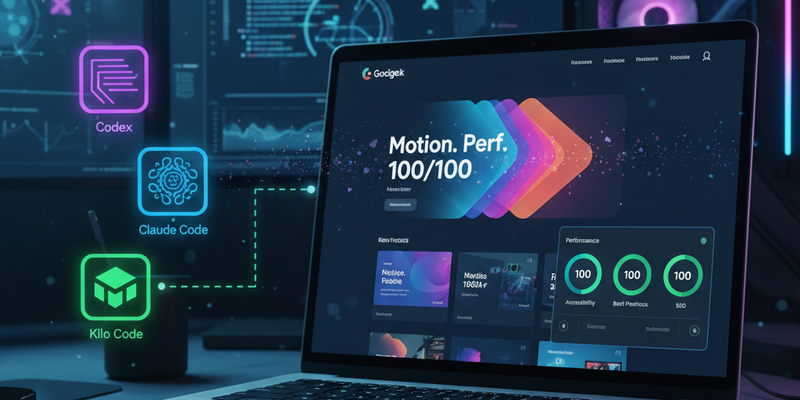
I wanted a portfolio that looks bold, feels alive, and still flies on a cold load. This is the build story: why I chose Astro + Svelte islands, how I structured content with Sanity, the motion system, how AI accelerated the work (Codex, Claude Code, Kilo Code), and the performance discipline that kept everything crisp. I hit a perfect 100/100 Lighthouse score—there’s a separate deep‑dive post coming that focuses only on how I achieved that result.
TL;DR
- Tech stack: Astro (Svelte islands), Sanity CMS, Tailwind CSS, Vercel (static output), GA4/GTM.
- Design goals: visually bold, motion‑forward, performance‑sane.
- AI partners: Codex, Claude Code, and Kilo Code for ideation, scaffolding, refactors.
- Result: Production‑ready site with 100/100 Lighthouse; performance deep‑dive coming next.
Why Astro + Svelte
- Islands architecture lets me hydrate only what matters. Static by default; interactive components hydrate on demand (nav/hero idle, below‑the‑fold on visibility).
- Static output keeps hosting simple and fast. Vercel’s CDN and edge cache do the heavy lifting.
- Svelte gives me extremely lightweight, expressive components for interactive sections without dragging a large client runtime across the whole site.
Core Architecture
- Content: Sanity for structured data (site settings, navigation, projects, experience, blog, analytics IDs). It keeps copy and project data versioned and portable.
- Styling: Tailwind CSS with a gradient‑forward theme, glassmorphism touches, subtle glow effects, and accessible contrast levels.
- Routing: Astro for pages/layouts; Svelte for dynamic islands (hero stats, interactive cards, sliders).
- Analytics: GA4 and GTM wired through the main layout with async loading and CSP allowances.
- Performance:
- Manual chunk splitting for predictable vendor bundles.
- Tree‑shaken icons (per‑icon imports) to avoid hauling entire icon packs.
- Deferred/non‑critical scripts; only hydrate islands that need it.
- Motion:
- Smooth scroll via Lenis as progressive enhancement.
- Staggered reveal animations, “word pull‑up” text effects, and a tasteful custom cursor.
- Hydration discipline and reduced‑motion support kept motion lovely and lightweight.
Design and Motion Choices
- Visual language: layered gradients + glass surface cards + soft shadows to create depth without heavy graphics.
- Typography: clean, modern sans with tight optical sizing; careful leading/line‑height for scannability.
- Motion system:
- Scroll‑triggered reveals with small translate/opacity changes (kept under ~200ms for snappiness).
- “Word pull‑up” animation on hero headlines to add personality without jank.
- Lenis smooth scroll (disabled when prefers‑reduced‑motion is set).
- Accessibility: semantic HTML, aria labels on interactive controls, keyboard‑friendly nav, and full support for prefers‑reduced‑motion.
How AI Helped (Codex, Claude Code, Kilo Code)
- Codex:
- Rapid refactors (hydration strategies, CSP tweaks, GA4/GTM wiring).
- Helped set up manual chunk splitting and linted performance‑sensitive scripts.
- Claude Code:
- Drafted content skeletons for sections; iterated on Sanity schema fields.
- Assisted with design copy and microcopy variations for CTAs and headings.
- Kilo Code:
- Suggested animation timing curves and Tailwind utility combinations.
- Provided quick “what if” alternatives for component structure and utility class reduction.
- Human in the loop: I kept final control on architecture, motion direction, and visual polish. AI saved time on boilerplate, transforms, and consistency checks.
Implementation Highlights (with file anchors)
- src/pages/index.astro
- Hydration strategy and SEO/structured data. The hero hydrates on visibility; heavier sections hydrate idle or on intersection.
---
import Layout from '../layouts/Layout.astro';
import Hero from '../components/Hero.svelte';
import Projects from '../components/Projects.svelte';
import Stats from '../components/Stats.svelte';

const site = {
  title: 'Shuvo Anirban Roy — Portfolio',
  description: 'Full‑stack work, motion‑forward design, and a performance‑first build.',
};
---

<Layout {site}>
  <Hero client:visible />
  <Stats client:idle />
  <Projects client:visible />
</Layout>
- src/layouts/Layout.astro
- Async analytics, CSP‑aware, and resource hints. GA4 is loaded async with anonymized IP; GTM is defer‑loaded. Fonts and CDNs are preconnected with care.
---
const { site } = Astro.props;
const GA_ID = import.meta.env.PUBLIC_GA_ID;
const GTM_ID = import.meta.env.PUBLIC_GTM_ID;
---

<html lang="en">
  <head>
    <meta charset="utf-8" />
    <title>{site.title}</title>
    <meta name="description" content={site.description} />

    <link rel="preconnect" href="https://fonts.gstatic.com" crossorigin />
    <link rel="preconnect" href="https://www.googletagmanager.com" crossorigin />

    {GA_ID && (
      <>
        <script async src={`https://www.googletagmanager.com/gtag/js?id=${GA_ID}`}></script>
        <script is:inline>
          window.dataLayer = window.dataLayer || [];
          function gtag(){dataLayer.push(arguments);}
          gtag('js', new Date());
          gtag('config', '{GA_ID}', { anonymize_ip: true });
        </script>
      </>
    )}

    {GTM_ID && (
      <script defer src={`https://www.googletagmanager.com/gtm.js?id=${GTM_ID}`}></script>
    )}
  </head>
  <body class="bg-neutral-950 text-neutral-100 antialiased">
    <slot />
    {GTM_ID && (
      <noscript><iframe src={`https://www.googletagmanager.com/ns.html?id=${GTM_ID}`} height="0" width="0" style="display:none;visibility:hidden"></iframe></noscript>
    )}
  </body>
</html>
- astro.config.mjs
- Static output and manual chunk splitting for predictable vendor buckets.
import { defineConfig } from 'astro/config';
import svelte from '@astrojs/svelte';

export default defineConfig({
  output: 'static',
  integrations: [svelte()],
  vite: {
    build: {
      rollupOptions: {
        output: {
          manualChunks: {
            'vendor-icons': ['lucide-svelte'],
            'vendor-motion': ['@studio-freight/lenis'],
            'vendor-cms': ['@sanity/client'],
          },
        },
      },
    },
  },
});
- src/lib/lenis.ts
- Progressive enhancement for smooth scroll, disabled for reduced motion.
import Lenis from '@studio-freight/lenis';

export function initLenis() {
  if (window.matchMedia('(prefers-reduced-motion: reduce)').matches) return;
  const lenis = new Lenis({ smoothWheel: true, smoothTouch: false });

  function raf(time: number) {
    lenis.raf(time);
    requestAnimationFrame(raf);
  }
  requestAnimationFrame(raf);
}
- src/components/Hero.svelte
- “Word pull‑up” effect using lightweight transforms and reduced‑motion fail‑safes.
<script lang="ts">
  export let title = 'Designer‑friendly. Developer‑fast.';
  const words = title.split(' ');
</script>

<h1 class="text-5xl md:text-7xl font-extrabold leading-tight">
  {#each words as w, i}
    <span
      class="inline-block will-change-transform"
      style={`animation: pullup 280ms ${100 + i * 60}ms both cubic-bezier(.2,.8,.2,1)`}
      >{w}</span>{' '}
  {/each}
</h1>

<style>
  @media (prefers-reduced-motion: reduce) {
    span { animation: none !important; }
  }
  @keyframes pullup {
    0% { transform: translateY(14px); opacity: 0; }
    100% { transform: translateY(0); opacity: 1; }
  }
</style>
- src/components/Projects.svelte
- Per‑icon imports for tree‑shaking; no barrel imports that bloat bundles.
<script>
  import { Code2 } from 'lucide-svelte';
  export let projects = [];
</script>

<ul class="grid gap-6 md:grid-cols-2">
  {#each projects as p}
    <li class="rounded-xl bg-white/5 backdrop-blur p-5 border border-white/10">
      <Code2 class="w-5 h-5 text-emerald-400" />
      <h3 class="mt-3 text-xl font-semibold">{p.title}</h3>
      <p class="mt-2 text-sm text-neutral-300">{p.summary}</p>
    </li>
  {/each}
</ul>
- vercel.json
- Asset caching and baseline security headers.
{
  "headers": [
    {
      "source": "/assets/(.*)",
      "headers": [
        { "key": "Cache-Control", "value": "public, max-age=31536000, immutable" }
      ]
    }
  ]
}
- Sanity schemas/*
- Models for site settings, navigation, projects, blog posts, analytics IDs. Content drives the site without touching code.
export default {
  name: 'project',
  title: 'Project',
  type: 'document',
  fields: [
    { name: 'title', type: 'string' },
    { name: 'summary', type: 'text' },
    { name: 'slug', type: 'slug', options: { source: 'title' } },
    { name: 'tech', type: 'array', of: [{ type: 'string' }] },
    { name: 'links', type: 'object', fields: [{ name: 'repo', type: 'url' }, { name: 'live', type: 'url' }] }
  ]
};
What Went Well
- Islands + hydration discipline kept JS lean and predictable.
- Tailwind let me iterate on gradients, glass surfaces, and contrast quickly without custom CSS sprawl.
- AI‑assisted refactors caught bundle bloat (icon barrels) and sequencing issues (analytics vs CSP).
- Achieved 100/100 Lighthouse without dialing back motion or visuals.
Trade‑offs and Lessons
- Smooth scroll is a progressive enhancement. Always provide a native fallback and obey prefers‑reduced‑motion.
- CSP must be updated intentionally when adding third‑parties; don’t over‑open it.
- Manual chunking beats auto when you understand your vendor shape (icons, motion libs, CMS client).
- Keep AI in the loop for drafts and refactors, but ship only what you fully review.
Final Result: 100/100 Lighthouse
Performance, Accessibility, Best Practices, and SEO each landed at 100. I’ll cover the exact techniques, measurements, and trade‑offs (including real audits and diffs) in a separate deep‑dive post focused solely on the Lighthouse journey.
What’s Next
- Publish the performance deep‑dive for the 100/100 Lighthouse run.
- Add minimal RUM via GTM (LCP/CLS/INP) to validate real‑world performance.
- Explore font subsetting and lightweight 3D accent elements without regressing perf.
If you’re curious about any specific part—Astro islands, Svelte motion patterns, Sanity schemas, or how I used Codex/Claude Code/Kilo Code—reach out and I’ll share more details.